After submitting your NSFAS application, the most important next step is to regularly check your NSFAS status. Your funding result does not appear immediately because NSFAS follows a multi-step verification process before making a final decision.
For the 2026 academic year, NSFAS reviews each application by verifying academic records, confirming household income through government databases, and checking registration details with universities or TVET colleges. Because this process takes time, applicants are encouraged to track their status frequently to stay informed about any updates or required actions.
When you perform a NSFAS status check, you may see different progress messages such as “Application Submitted,” “Filtering,” “Validation,” “Provisionally Funded,” “Funding Eligible,” or “Payments Processing.” Each status reflects a specific stage of your application, from initial submission to final funding and allowance disbursement.
NSFAS Status Check Methods for 2026
There are several reliable ways to track your NSFAS application for 2026. All methods work on mobile phones, laptops, and desktop computers with an internet connection.
How to Check NSFAS Status Online (2026)
The official NSFAS website remains the fastest and most secure way to check your application status.
Steps:
- Visit the official NSFAS website at www.nsfas.org.za
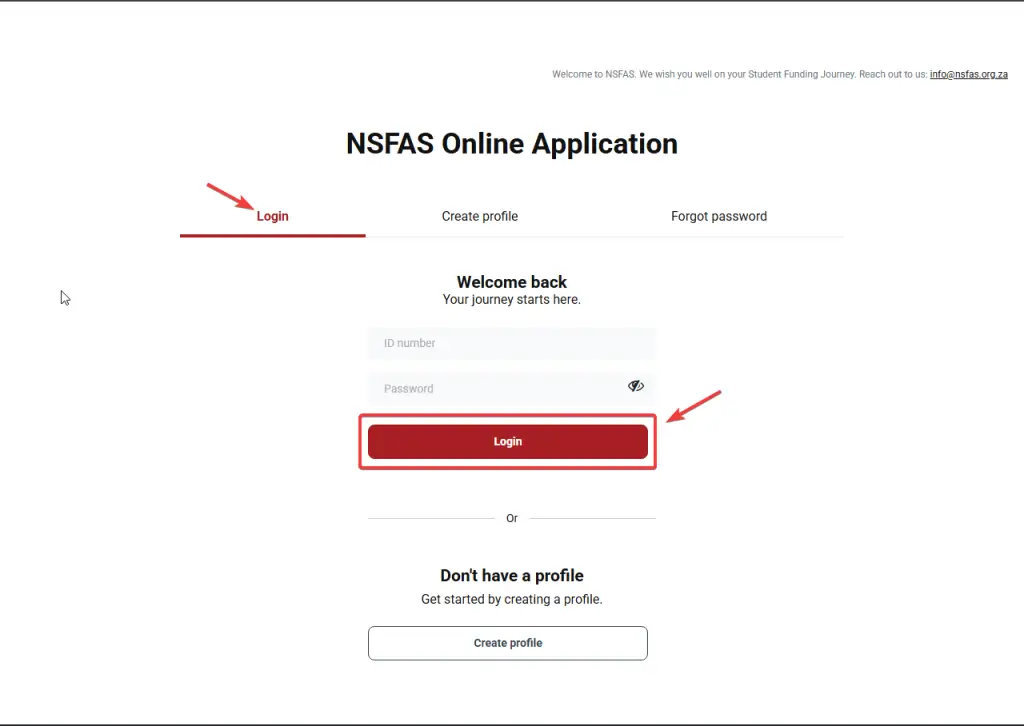
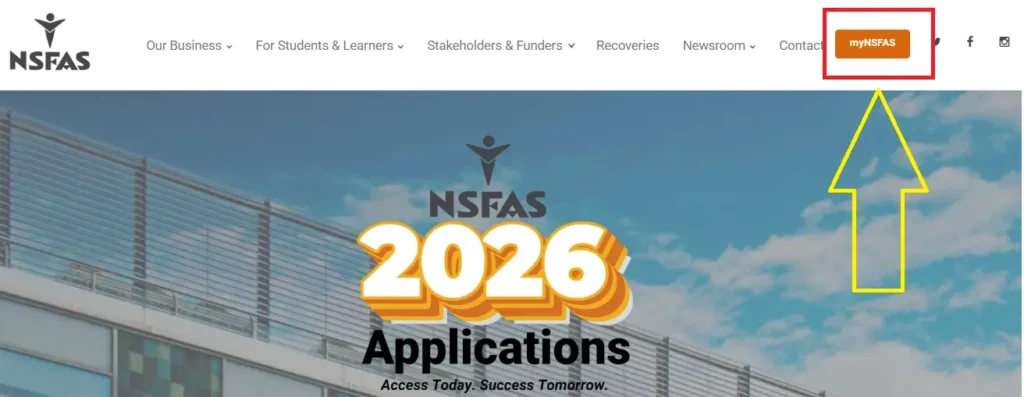
- Click on “myNSFAS” at the top of the page
- Log in using your South African ID number or registered email address and password
- Open your dashboard and select “Application Status”
- Your current NSFAS status will be displayed
This method is recommended for applicants who already have a registered myNSFAS account.
NSFAS Status Check Using ID Number (2026)
Applicants can also check their NSFAS status using their South African ID number, which is especially helpful if email access is unavailable.
Steps:
- Go to www.nsfas.org.za
- Click “myNSFAS”
- Log in using your ID number and password
- Select “Application Status”
- View your funding progress
Make sure the ID number entered matches the one used during the application, otherwise access may be denied.
NSFAS Status Check Using Reference Number
If you no longer have access to your login details, NSFAS allows status tracking using your application reference number. This number is issued after successful submission of your application.
Steps:
- Access the NSFAS portal
- Open your myNSFAS account (or register if required)
- Navigate to “My Applications”
- Choose “Check Status”
- Enter your NSFAS reference number and submit
Your application status may show updates such as “Awaiting Academic Results,” “Approved,” or “Funding Confirmed.”
Important 2026 Update
For 2026, NSFAS continues to improve its digital verification system. Applicants may be required to:
- Update missing documents online
- Confirm personal details
- Ensure college or university registration is completed on time
Failure to complete these steps may delay funding or payments.
NSFAS Status Check via WhatsApp (2026)
NSFAS provides an official WhatsApp service that allows students to track their application status anytime, even at night.
Steps to Check NSFAS Status on WhatsApp:
- Save the official NSFAS WhatsApp number: 078 519 8006
- Open WhatsApp and send “Hi”
- Choose the option for Application Status from the menu
- Enter your South African ID number or NSFAS reference number
- NSFAS will reply with your current 2026 application status
Why Use WhatsApp?
- Fast and easy to use
- Works without internet on some networks
- Available 24/7
- Ideal for students in remote areas
NSFAS Status Check via USSD (SMS Code)
NSFAS also offers a USSD service that works on all mobile phones, including basic feature phones.
How to Check NSFAS Status Using USSD:
- Dial *120*67327# on your phone
- Follow the on-screen instructions
- Enter your ID number or reference number
- You will receive an SMS with your NSFAS status
Benefits of USSD:
- No internet or data required
- Works on all phones
- Simple and quick process
Note: The USSD system may sometimes be slow or temporarily offline. If this happens, try WhatsApp or the online portal.
Create a myNSFAS Account for Online Status Checks (2026)
To check your NSFAS status online, you must first create a myNSFAS account. This is the official portal where NSFAS shares all updates, including application progress, funding decisions, and payment notifications.
Steps to Create a myNSFAS Account:
- Visit the official NSFAS website
- Click on “myNSFAS”
- Select Register
- Enter your ID number, full name, and email address
- Create a strong password
- Confirm your account via SMS or email
- Log in and select Application Status
Why a myNSFAS Account Is Important:
- Required for online status checks in 2026
- Shows funding approval or rejection
- Displays payment and allowance updates
- Links all NSFAS records to one profile
NSFAS Status Check Meaning in 2026
When you check your NSFAS status for the 2026 academic year, your myNSFAS dashboard will show one of several messages. These statuses each represent a specific step in the funding review process. Understanding what each one means helps you know where your application stands and what comes next so you don’t miss important deadlines or actions.
What Each NSFAS Status Means
| NSFAS Status | What It Means | Next Step or What You Should Do |
| Application Submitted | Your application was received by NSFAS successfully and is now in the queue for processing. | Nothing yet — just wait and check again. |
| Filtering | NSFAS is checking basic information and ensuring you are a first‑time or returning applicant and that you meet initial requirements. | No action required at this stage. |
| Validation | NSFAS is verifying your ID, household income, and any grant info with official records (e.g., SASSA). | Make sure your documents are correct and reachable. |
| Evaluation | NSFAS is reviewing all your academic and financial documents to confirm eligibility. | Wait for further updates. |
| Funding Eligibility | NSFAS is checking if you meet all criteria for funding, including income and academic requirements. | Ensure you upload any requested documents quickly. |
| Awaiting Academic Results | NSFAS is waiting for your school or college to send your exam results or academic data. | Contact your institution to confirm results submission if it’s taking long. |
| Awaiting Registration | NSFAS is waiting for your university or TVET to confirm your official registration for the year. | Check with your college/university financial aid office so they send your registration details. |
| Provisionally Funded | You are likely approved, but NSFAS still needs a few final checks like registration confirmation or final documents. | Complete any requested steps (e.g., sign bursary agreement, submit registration). |
| Approved for Funding | Your application is fully approved. NSFAS will pay your fees and allowances based on your course. | No further action is needed — just monitor payments. |
| Payments | NSFAS has started releasing funds to your institution or your NSFAS wallet (for allowances). | Track your payments and ensure your bank details are correct. |
| Unsuccessful / Rejected | Your application was not approved. You can appeal if you think the decision is wrong. | Submit an appeal within the allowed window (about 30 days). |
This shows the most common status messages you’ll see during 2026 and broadly what they mean from submission to funding or rejection.
What Happens If Your NSFAS Status Says “Unsuccessful”?
If your status changes to Unsuccessful or Rejected, it means NSFAS did not approve your funding at that time. This doesn’t always mean the end of NSFAS gives students a chance to appeal if you believe you still qualify or if there was a documentation error. To appeal a rejection:
- Log into your myNSFAS account at www.nsfas.org.za.
- Go to “Track Funding Progress”.
- If eligible to appeal, you’ll see a “Submit Appeal” option.
- Upload supporting documents (e.g., updated income proof, academic results, medical records if relevant).
- Click “Submit Appeal Form” and wait appeals are usually reviewed within a few weeks.
NSFAS typically gives about 30 days from the date of rejection to appeal, so act quickly if needed.
NSFAS 2026 Application Cycle Notes
- Applications for the 2026 academic year closed on 15 November 2025.
- NSFAS usually starts publishing application results on the myNSFAS portal from mid‑December 2025, so if you applied during the window, you should begin to see status updates around that time.
- In some cases (especially for TVET applicants or late applicants), NSFAS may open additional application periods later in the cycle announcements will be made on the official site or NSFAS WhatsApp line.
How NSFAS Processes Your Application
After submission, NSFAS works through a series of checks eligibility filtering, validation with income/identity records, academic evaluation, and finally funding decisions. Only when all checks are passed and the institution confirms your registration will you move to Approved for Funding and then Payments status.
NSFAS Funded Courses & Funding Guide for 2026 (Updated)
Before you check your NSFAS status, always make sure your course and institution qualify for NSFAS funding. If your status shows “Funding Ineligible” or “Unsuccessful,” often the issue is that the course or school you chose isn’t eligible for funding.
Which Institutions NSFAS Funds (2026)
NSFAS only provides financial aid for full‑time studies at public institutions in South Africa:
- All 26 public universities (e.g., UCT, UNISA, Wits, UJ, NWU).
50+ Public TVET (Technical and Vocational Education and Training) colleges. - NSFAS does NOT fund private colleges or private universities under any circumstances.
Courses NSFAS Typically Funds
1. University Qualifications (Undergraduate)
NSFAS supports standard undergraduate studies that lead to recognised qualifications:
- Bachelor’s degrees (BA, BSc, BCom, BEd, LLB, etc.)
- Diplomas and Advanced Diplomas
- Higher Certificates
- STEM courses (Engineering, IT, Science, Maths)
- Health sciences (e.g., Nursing, Laboratory Science)
- Humanities, Business, Education, Agriculture, and related fields
2. TVET College Programmes
NSFAS funds vocational training courses such as:
- NC(V) programmes (National Certificate Vocational)
- Report 191 (NATED) courses (e.g., N1–N6 for Business or Engineering)
- Hospitality, Tourism, IT, Office Administration, Agriculture and more
Courses NSFAS Does NotFund
NSFAS generally does NOT pay for:
- Private college courses
- Short non‑accredited courses or workshops
- Most postgraduate programmes (e.g., Honours, Master’s, PhD)
- Part‑time and second degrees in many cases
NSFAS Funding Benefits in 2026
Once your status shows “Approved for Funding”, NSFAS will pay the costs listed below — either directly to your institution or via allowances.
University Students What NSFAS Covers
| Expense | Covered By NSFAS |
| Tuition Fees | Fully covered |
| Registration Fees | Paid directly |
| Accommodation | On‑campus or approved housing (capped) |
| Transport Allowance | If you live far from campus |
| Living Allowance | Food and daily needs |
| Book/Learning Materials | Textbooks & tools |
Typical support includes book allowance, living and travel support capped annually. Latest figures show around R5,400+ for books and monthly living allowances, but exact amounts can vary.
TVET College Students What NSFAS Covers
| Expense | Covered By NSFAS |
| Tuition Fees | Fully covered |
| Accommodation | Approved housing |
| Transport Allowance | If commuting over set distance |
| Living Allowance | Monthly support |
| Personal Care Allowance | For hygiene and basic needs |
TVET allowances are structured to cover daily needs and living costs, with extra support for personal care.
2026 Allowance Breakdown (Updated Estimates)
Below are updated NSFAS allowance figures for 2026 (some values may be adjusted by NSFAS mid‑year when finalised):
| Allowance Type | Approx. Annual Amount |
| Learning Materials (Books) | R5,600+ |
| Living Allowance | R17,000+ |
| Transport | R7,000–R8,000+ |
| Accommodation Support | Up to approx. R45,000–R52,000 (capped) |
| Personal Care (TVET) | R3,100+ |
These figures reflect broad national caps; final amounts depend on your situation and institution.
Important Tips for NSFAS Success in 2026
Check your course is DHET‑approved and offered by a public university or TVET college.
Submit all required documents ASAP if NSFAS requests paperwork, you have about 30 days to upload it. Monitor your status regularly on the myNSFAS portal, WhatsApp or USSD to avoid delays.
Incomplete registration or wrong bank/wallet details can pause payments even after approval.
NSFAS Status Terms You Should Know
- Verification / Awaiting Documents – NSFAS still needs info.
- Awaiting Registration – NSFAS waiting for your institution to confirm enrolment.
Provisionally Funded / Approved – Funding is confirmed; expect payments soon. - Payments – Allowances have started being issued.
- Unsuccessful / Funding Ineligible – Check eligibility or appeal within deadlines (often ~30 days)
Who Qualifies for NSFAS Funding in 2026
To be considered for financial aid from the National Student Financial Aid Scheme (NSFAS) for the 2026 academic year, applicants must meet the following core eligibility requirements:
General Eligibility Criteria
1. South African Citizenship
You must be a South African citizen or permanent resident with a valid ID number.
2. Public Institution Registration
You must be registering or already registered to study at a public university or a public TVET college. NSFAS does not fund private institutions.
3. Household Income Threshold
- Combined household income must be R350,000 or less per year.
- If you are a student living with a disability, the household income threshold rises to R600,000 per year.
4. Academic Entry Requirements
You must meet the minimum academic entry criteria for your chosen programme (e.g., passed Grade 12/matric or TVET prerequisites).
5. First Qualification Rule
You cannot receive NSFAS funding if you have already been funded for the same or a higher qualification previously.
6. Contact Information Requirement
A valid email address and cellphone number are required so NSFAS can send updates.

SASSA February 2026 Grant Payments Details Official Schedule Check Online
NSFAS Funds Over One Million Learners Student In South Africa

NSFAS Confirms R1500 Allowance Check Complete Payment Status Details

SASSA Child Grant Guide Essential Support for South African People Check New 2026 Details
NSFAS 2026 Funding Approved Check Online Application Update

SASSA Bonus Grant Changes Check Payment Timing And what is Required to be Eligible? Full Details
How Eligibility Affects Your NSFAS Status Check
When you check your application status on the myNSFAS portal, NSFAS evaluates all of the above criteria. Your current status will reflect whether you qualify, need to submit more info, or were unsuccessful:
| Status Message | What It Means |
| Application Submitted | Your application was received successfully. |
| Filtering | NSFAS is checking your details against its eligibility criteria. |
| Validation | Personal and household details are being verified with government databases. |
| Evaluation | Financial and academic eligibility are under review. |
| Awaiting Academic Results | NSFAS is waiting for confirmation of your grades or admission. |
| Provisionally Funded | Conditional approval — final funding depends on registration. |
| Approved for Funding | Your application meets all criteria — funding will be processed. |
| Unsuccessful / Not Eligible | You did not meet one or more eligibility requirements. |
(Based on common status meanings published for 2026 application cycles.)
Common Reasons for “Unsuccessful” Status
If your status shows “Unsuccessful” on myNSFAS, it may be due to:
- Incorrect or incomplete personal information
- Missing supporting documents (e.g., income proof)
Household income above the allowable threshold - Applying for a non‑funded programme or private college
- Duplicate applications under different contact details
You can appeal or update your application if you believe the decision is incorrect.
NSFAS 2026 Payment Overview
Once approved, NSFAS funding typically includes:
- Full tuition coverage for public institutions
- Monthly living allowance
- Learning materials and textbooks allowance
- Accommodation support (where applicable)
- Travel allowance (if needed)
Payments start after your institution confirms your registration with NSFAS.
How to Reset Your myNSFAS Login for Status Checks
If you have trouble logging into your myNSFAS account, follow these steps to reset your login:
- Go to the official NSFAS website: www.nsfas.org.za
- Click myNSFAS (top right)
- Choose “Forgot Password”
- Enter your South African ID number
- Select whether to reset your password, username, or both
- Complete the security form and submit
- NSFAS will send a reset link via SMS and email
Use the link to set new login details
Once reset, log in to check your current application status and update your contact info.
Tips for a Successful NSFAS 2026 Application
- Apply early and before the deadline (typically in late 2025).
- Ensure all supporting documents are accurate and uploaded.
- Keep your contact details up to date to receive SMS/email alerts.
- If rejected, appeal within the allowed timeframe.
Conclusion
NFSAS will definitely introduce different and reliable ways for students to check NSFAS status in 2025. Through NFSAS status, you can monitor your funding and through NFSES status, you can plan your next steps without having to call or visit any office.
It should be kept in mind that the information you provide should be accurate and up-to-date. NSFAS helps in processing your funding without any delay and ensures that you do not miss any updates.
