Monitor Your NSFAS Application Status Check Online Step by Step
Are you wondering whether your NSFAS funding is on track? Checking your myNSFAS application status is the best way to stay informed. By monitoring your status, you’ll know exactly what stage your application is at whether it’s complete, under review, approved, or rejected. This guide will walk you step by step through the process, making it simple even for first-time users.
Why Monitoring Your NSFAS Application Status Is Important
Tracking your NSFAS application status is more than just a formality. Here’s why it matters:
- Avoid delays: Promptly submitting missing documents prevents unnecessary processing delays.
- Stay informed: You’ll know immediately if NSFAS requires updates or further verification.
- Ensure funding: Regular monitoring increases the chance that your approved funding will reach you on time.
Think of it like checking your bank account before making a big purchase it’s all about being proactive.
Visit the myNSFAS Portal
To begin, you need to access the official myNSFAS portal. Follow these simple steps:
- Open your browser and go to www.nsfas.org.za.
- Click the myNSFAS button located at the top-right corner of the homepage.
Once you’re on the portal, you’re ready to log in and check your application status.
Log In to Your Account
Logging in is straightforward but requires accurate information:
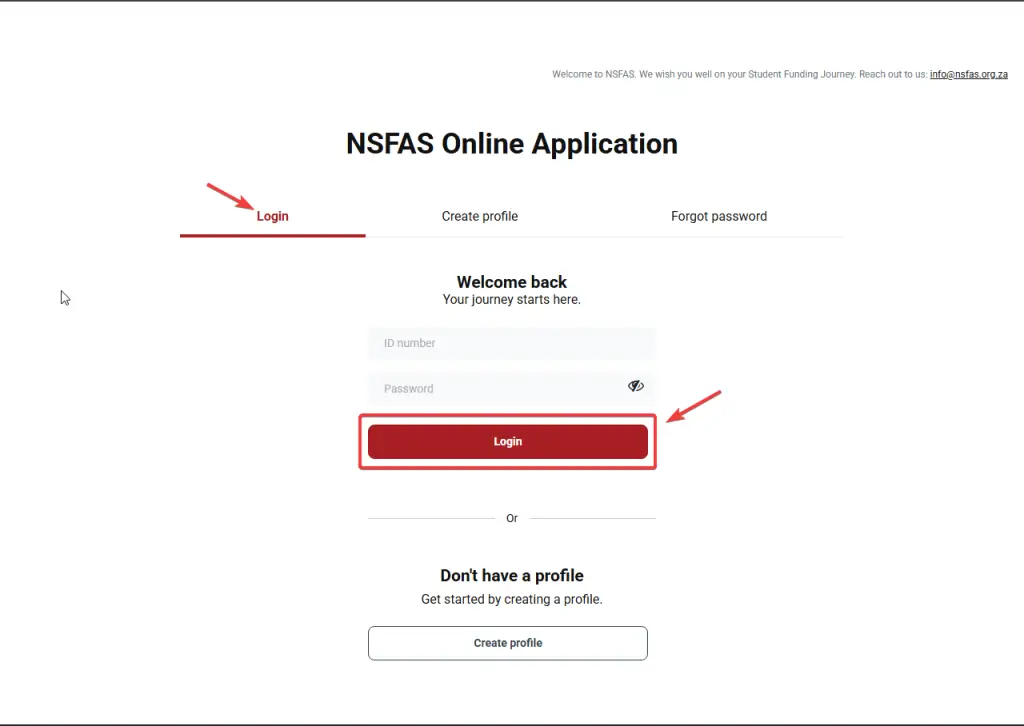
- Enter your registered email address and password.
- Complete the CAPTCHA to confirm you are not a robot.
- Click Sign In to access your account.
How to Reset Your Password
If you forgot your password:
- Click Forgot Password on the login page.
- Enter your registered email address.
- Follow the email instructions to create a new password.
Logging in successfully is the first step to keeping your NSFAS application on track.
Check Your Application Status
Once logged in:
- Navigate to the Track Application Progress or Application Status tab.
- Click it to view your current application stage.
You’ll see a clear summary of your application, making it easy to understand what actions, if any, you need to take.
Also read: NSFAS Status via WhatsApp
Understand the Status Terms
NSFAS uses specific terms to describe your application stage. Understanding these terms ensures you know exactly what’s happening with your funding.
| Status | Meaning |
|---|---|
| Application Submitted | NSFAS has received your application and is processing it. |
| Documents Missing | Specific documents are required before processing continues. |
| Under Review | NSFAS is verifying your details for eligibility. |
| Approved | Your application is successful; funding is approved. |
| Rejected | Application does not meet NSFAS criteria; reasons are provided. |
Knowing these terms prevents confusion and helps you respond appropriately.
Take Action Based on Your Status
Different statuses require different actions:
- Documents Missing: Upload the required documents immediately to avoid delays.
- Under Review: Wait patiently while NSFAS verifies your details, but check for messages.
- Approved: Accept your funding and prepare for disbursement.
- Rejected: Review the reason, correct mistakes, and consider reapplying if possible.
Check Regularly for Updates
Your application status can change frequently. It’s recommended to:
- Log in at least once a week.
- Check for new document requests.
- Confirm approval and accept funding promptly.
Regular monitoring ensures you never miss an important update.
Alternative Methods to Check Your Status
Besides logging in, there are other convenient ways to track your application:
- Using Your ID Number: Quick check without logging in.
- Via WhatsApp: NSFAS provides a chat option for status updates.
- Reference Number: Track application if you lost account details.
These alternatives are helpful if you encounter login issues.
Tips to Avoid Delays in NSFAS Application Processing
- Upload clear, legible documents.
- Ensure your contact information is up to date.
- Respond promptly to any NSFAS requests.
- Avoid submitting duplicate applications.
Following these tips keeps your funding on schedule.
Common Mistakes Students Make While Checking Their Status
- Ignoring notifications from NSFAS.
- Failing to upload required documents in time.
- Logging in too infrequently.
- Assuming status means automatic approval without checking.
Avoiding these mistakes saves time and prevents unnecessary frustration.
How to Prepare Documents for NSFAS Quickly
- Gather certified copies of your ID and academic records.
- Scan documents clearly and label them properly.
- Keep a digital backup for easy uploading.
Being prepared ensures your application moves smoothly through each stage.
FAQs
Conclusion
Monitoring your myNSFAS application status is essential to ensure your financial aid is processed smoothly. By following the steps in this guide logging in, checking your status, understanding the terms, and taking timely action you can stay informed and keep your funding on track. Regular monitoring is not just a task; it’s a smart way to secure your education funding without stress.