NSFAS Status Check Using ID Number 2026 Check Final Funding Details
The NSFAS Status Check Using ID Number 2026 process is now one of the most important steps for students who applied for funding for the 2026 academic year. The National Student Financial Aid Scheme (NSFAS) has officially finalised funding decisions, and applicants can now view their final outcomes online.
If you applied during the 2025 application cycle, which closed on 15 November 2025, you can now log in and check your funding result. This guide explains how to check your NSFAS status using your ID number, what each funding outcome means, what to do next, and how to secure your funding for 2026.
Understanding NSFAS and the 2026 Funding Finalisation
The National Student Financial Aid Scheme (NSFAS) is a government-funded financial aid scheme that supports eligible South African students studying at public universities and TVET colleges. It covers tuition fees, accommodation, allowances, and other study-related expenses for qualifying students.
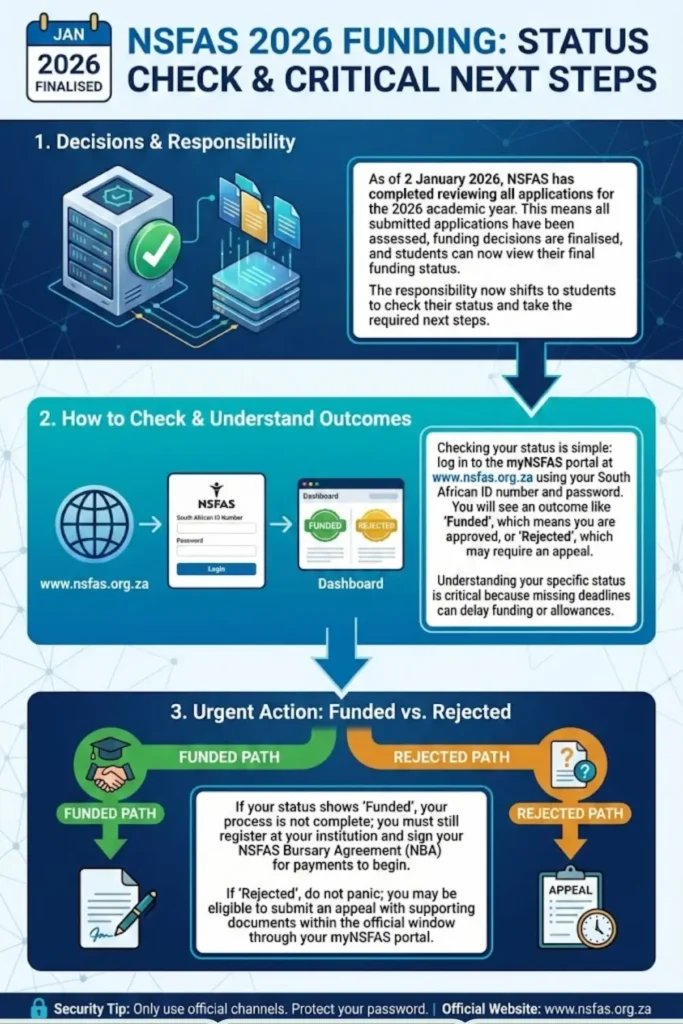
As of 2 January 2026, NSFAS has completed reviewing all applications for the 2026 academic year. This means:
- All submitted applications have been assessed
- Funding decisions are finalised
- Students can now view their final funding status
- Appeal windows are opening for qualifying rejected applicants
The responsibility now shifts to students to check their status and take the required next steps.
You can also read: SASSA Approved Status Check Common Problems With Approved Status
How to Do NSFAS Status Check Using ID Number 2026
Checking your NSFAS status is simple if you follow the correct steps. You only need your South African ID number and password.
Step-by-Step Process
- Visit the official NSFAS website: www.nsfas.org.za
- Click on the “myNSFAS” tab
- Enter your:
- South African ID number
- Password
- Click Login
- View your application status on your dashboard
After logging in, your funding outcome will appear on your profile. If you cannot log in, use the “Forgot Password” option to reset your details via SMS or email.
Always type the website address manually to avoid phishing websites.
What Each NSFAS 2026 Status Means
Once you complete your NSFAS status check using ID number 2026, you will see one of several outcomes. Each status requires a different action.
| NSFAS Status | Meaning | What You Must Do |
|---|---|---|
| Application Submitted | Your application was received | Wait for processing updates |
| Processing | Verification is underway | No action required |
| Provisionally Funded | You qualify, pending registration | Complete registration at institution |
| Funded | Fully approved for 2026 | Sign bursary agreement |
| Rejected | You do not meet criteria | Check if appeal is available |
| Awaiting Registration Confirmation | Institution must confirm enrollment | Register immediately |
Understanding your status is critical because missing deadlines can delay funding or allowances.
What to Do If You Are Funded for 2026
If your status shows Funded, congratulations. However, your process is not fully complete. You must still meet final requirements before payments begin.
After approval:
- Register at your public university or TVET college
- Ensure your registration data is submitted to NSFAS
- Sign your NSFAS Bursary Agreement (NBA)
- Confirm your banking or allowance details
Funding will only be activated after your institution confirms your academic registration with NSFAS.
You can also read: SASSA Cancelled Status 2026 How to Reapply After Cancellation
What to Do If Your Application Is Rejected
If your NSFAS status check using ID number 2026 shows Rejected, do not panic. Many students qualify to submit an appeal.
You may appeal if:
- Household income was incorrectly assessed
- You experienced a change in financial circumstances
- There was missing or incorrect documentation
- You meet academic progression rules
Appeals must be submitted within the official appeal window through your myNSFAS portal. Supporting documents are required, and late appeals are not accepted.
Common Problems When Checking NSFAS Status
During peak periods, students may experience login or system issues. Below are common problems and practical solutions.
Website Not Loading
- High traffic during registration period
- Try accessing early morning or late evening
- Clear browser cache
- Use a different browser
OTP Not Received
- Poor network signal
- Old cellphone number
- Email in spam folder
- Retry after a few minutes
ID Number Not Found
- Account not registered
- Incorrect ID entered
- Duplicate profile issue
If problems continue, contact the NSFAS support centre using official channels only.
You can also read: NSFAS Application 2026 Status Check Online Step by Step
Important 2026 NSFAS Timelines
Now that applications are finalised, students must focus on registration and payment processes.
Key timelines include:
- January 2026 – Registration confirmation
- January to February 2026 – Bursary agreement signing
- February 2026 – Allowance disbursements begin
- Appeal window – Opens shortly after final results
Checking your account regularly ensures you do not miss critical updates.
Security Tips When Accessing Your NSFAS Account
Because NSFAS funding is valuable, scams are common. Protect yourself at all times.
- Never share your password
- Do not pay anyone to “fix” your NSFAS
- Only use the official NSFAS website
- Avoid public computers
- Do not click suspicious links from social media
NSFAS does not charge application or processing fees.
Why NSFAS Status Check Using ID Number 2026 Is Important
Failing to check your status can result in serious delays. Students who do not monitor their accounts may:
- Miss funding confirmation
- Lose appeal opportunities
- Delay allowance payments
- Face registration problems
Your myNSFAS portal is your official communication channel. It is your responsibility to log in and stay informed.
Frequently Asked Questions
Conclusion
The NSFAS Status Check Using ID Number 2026 process is now open for all applicants. Funding decisions have been finalised, and every student must log in to confirm their outcome.
Make sure you:
- Check your final funding status
- Register at your institution
- Sign your bursary agreement
- Submit appeals if necessary
- Keep your contact details updated
Taking these steps ensures you secure your funding and begin the 2026 academic year without unnecessary delays. Stay proactive, use official communication channels, and manage your funding responsibly.