How NSFAS Track Your Application Status Check Online Step by Step

Tracking your NSFAS application status is one of the most important steps after submitting your funding application. It tells you where your application stands, what stage it is in, and whether you qualify for funding. Without checking regularly, you may miss important updates, document requests, or deadlines that could affect your chances of receiving financial support.
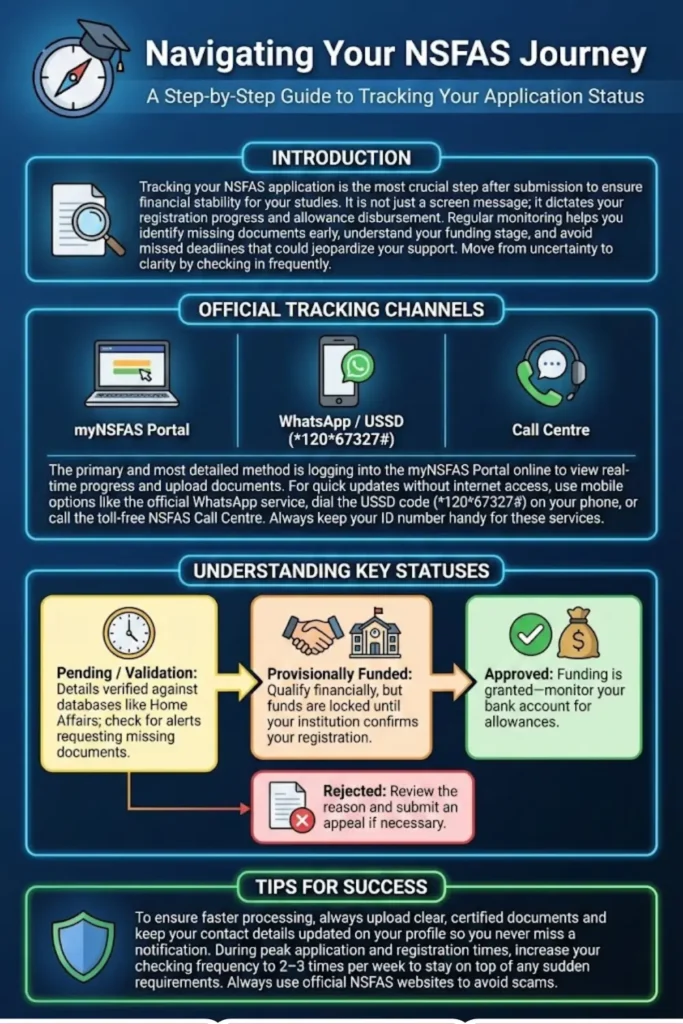
This guide explains everything in simple language. You will learn how to track your NSFAS application online step by step, understand what each status means, and know exactly what to do next. The goal is to help you move from uncertainty to clarity.
Introduction to NSFAS Application Tracking
Your NSFAS status is more than just a message on a screen. It directly affects your studies, registration, and financial stability. When your status changes, it usually signals progress or a required action.
Tracking helps you:
- Know if your application is being processed
- See if documents are missing
- Confirm if funding is approved
- Prepare for registration and allowances
When you ignore your status, delays can occur. Simple follow-ups often prevent bigger problems later.
You can also read: Details of Grants Awarded in SASSA 2026 Child Support
What You Can Learn From Your Status
Your application status shows:
- Whether your application was received
- If your documents are verified
- If you meet financial eligibility
- If your institution confirmed registration
- If funding has been approved or declined
Each label gives a clue about what stage your application is in and what you should do next.
Understanding the NSFAS Application Journey
The NSFAS process follows a clear path. Your application does not jump straight from submission to approval. It passes through several checks.
Typical journey:
- Application submitted
- Filtering and validation
- Evaluation
- Funding eligibility
- Awaiting registration
- Approved or rejected
Knowing this journey helps you understand why some stages take time.
Who Verifies Your Information
Different departments and systems check your data:
- Home Affairs verifies your ID
- SASSA checks social grant status
- NSFAS verifies household income
- Institutions confirm academic registration
Because many systems are involved, delays can happen. This is normal during peak periods.
What You Need Before Checking Your NSFAS Status
Before logging in, make sure you have:
- South African ID number
- myNSFAS username and password
- Reference number (if available)
Having these ready saves time and avoids failed login attempts.
Document Preparation
Keep digital copies of:
- Certified ID copy
- Proof of income or SASSA letter
- Academic records
- Consent forms (if applicable)
Clear documents make it easier to respond quickly if NSFAS requests more information.
Official Platforms to Check NSFAS Status
myNSFAS Portal
The myNSFAS portal is the main platform for checking your application status. It provides real-time updates and messages.
You can:
- Track application progress
- Upload documents
- View funding outcome
- Update personal details
NSFAS Website
The NSFAS website links directly to the myNSFAS portal. It also provides announcements, guidelines, and contact details.
Always use official websites to avoid scams.
How to Track Your NSFAS Application Online Step by Step
Logging Into Your Account
Follow these steps:
- Open the official NSFAS website
- Click on myNSFAS
- Enter your ID number and password
- Complete any OTP verification
Once logged in, you will see your dashboard.
Viewing Your Application Outcome
After logging in:
- Click on “Track Application”
- Select “Application Status”
- Read the displayed status message
Take note of any instructions or document requests.
Alternative Ways to Check NSFAS Status
WhatsApp Service
NSFAS offers an official WhatsApp line for quick updates.
You will need:
- Your ID number or reference number
- A mobile phone with WhatsApp
Follow the menu prompts to receive your status.
USSD and SMS
If you do not have internet access:
- Dial 12067327#
- Follow the prompts
This option works on basic phones.
Call Centre
You can call the NSFAS toll-free number:
- 0800 067 327
Have your ID number ready when calling.
Common NSFAS Application Statuses Explained
This means your application was received and entered into the system.
At this stage:
- No action is needed
- Your details are being checked
Validation and Evaluation
Your documents and income details are being reviewed.
Possible outcomes:
- Move to funding eligibility
- Request for additional documents
Provisionally Funded
You appear to qualify for funding, but registration must still be confirmed.
Approved
Funding is granted. You can expect tuition payments and allowances once registration is confirmed.
Rejected
Your application was unsuccessful. Reasons are usually shown on the portal.
What to Do When Your Status Is Pending
Pending status may be caused by:
- Missing documents
- Verification delays
- High application volume
Actions You Should Take
- Check portal messages
- Upload requested documents
- Ensure contact details are correct
- Wait patiently during peak periods
Avoid submitting multiple applications.
You can also read: SASSA Reapplication Process Complete
Understanding “Awaiting Registration”
Why Registration Matters
NSFAS cannot release funds until your institution confirms you are registered.
How to Resolve It
- Contact your institution’s financial aid office
- Confirm your registration status
- Ask when they will submit confirmation to NSFAS
Once registration is confirmed, your status usually changes.
What Happens After NSFAS Approval
Tuition Payment
NSFAS pays tuition fees directly to your institution.
You do not receive this money personally.
Allowance Disbursement
Allowances may include:
- Accommodation
- Meals
- Transport
- Learning materials
Payments go to your bank account or NSFAS wallet.
NSFAS Funding Coverage
Costs Covered
NSFAS commonly covers:
- Registration fees
- Tuition fees
- Accommodation
- Study materials
- Living allowance
Costs Not Covered
NSFAS does not cover:
- Private institution fees
- Outstanding historical debt (in most cases)
- Luxury expenses
Always check your award letter for specifics.
How Often You Should Check Your Status
Peak Periods
During application and registration periods:
- Check 2 to 3 times per week
Normal Periods
Outside peak times:
- Check once a week
Frequent checking ensures you never miss updates.
Troubleshooting Login Problems
Forgotten Password
Use the “Forgot Password” option on the login page.
Steps:
- Enter ID number
- Receive OTP
- Create new password
OTP Issues
If OTP does not arrive:
- Check network signal
- Confirm phone number on profile
- Try again later
If problems persist, contact NSFAS support.
Fixing Incorrect Personal Details
ID Errors
If your ID number is wrong:
- Update profile details
- Upload certified ID copy
Contact Details
Always keep:
- Email address
- Phone number
up to date to receive notifications.
NSFAS Appeals Process
When to Appeal
You can appeal if:
- You were rejected
- You believe the decision is incorrect
How to Submit an Appeal
- Log into myNSFAS
- Click “Appeal”
- Upload supporting documents
- Submit within the appeal period
Appeals take time, so be patient.
Avoiding NSFAS Scams
Safe Practices
- Use only official websites
- Never pay anyone to help you
Warning Signs
- Requests for payment
- Fake social media pages
- Promises of guaranteed approval
If unsure, contact NSFAS directly.
NSFAS Status and What to Do
| NSFAS Status | Meaning | What You Should Do |
|---|---|---|
| Submitted | Application received | Wait |
| Validation | Documents being checked | Ensure documents are correct |
| Evaluation | Financial eligibility review | Wait |
| Provisionally Funded | Likely approved | Confirm registration |
| Awaiting Registration | Institution not confirmed | Contact institution |
| Approved | Funding granted | Monitor payments |
| Rejected | Not approved | Consider appeal |
Tips for Faster Processing
- Upload clear documents
- Keep details accurate
- Respond quickly to requests
- Check status regularly
Small actions can prevent long delays.
Conclusion
Tracking your NSFAS application status is the simplest way to stay in control of your funding journey. By using the official myNSFAS portal and other trusted channels, you can see exactly where your application stands and what steps to take next. Understanding each status label removes confusion and helps you act quickly when needed.
You can also read: NSFAS February Payment Details R1500
Make it a habit to check your status regularly, keep your documents and contact details updated, and communicate with your institution when required. With the right approach, you can move through the NSFAS process with confidence and clarity.