SRD dsd gov za Appeal Status Check Latest SRD R370 Payment Dates
Navigating the SRD dsd gov za appeal status check process and staying updated with the latest SRD R370 payment dates is essential if you depend on the Social Relief of Distress grant. With the extension of the grant and the increase from R350 to R370, verification systems have become stricter. Many applicants now experience additional checks before payments are processed.
This comprehensive guide explains the current SRD R370 payment schedule, how to check your appeal status, what different dashboard messages mean, and how to resolve common payment problems. The aim is to provide clear, practical information in simple language so you can avoid unnecessary delays.
Understanding the SRD R370 Grant System
The Social Relief of Distress (SRD) R370 grant is managed by the South African Social Security Agency under the Department of Social Development. It is designed to support unemployed individuals who meet specific income criteria.
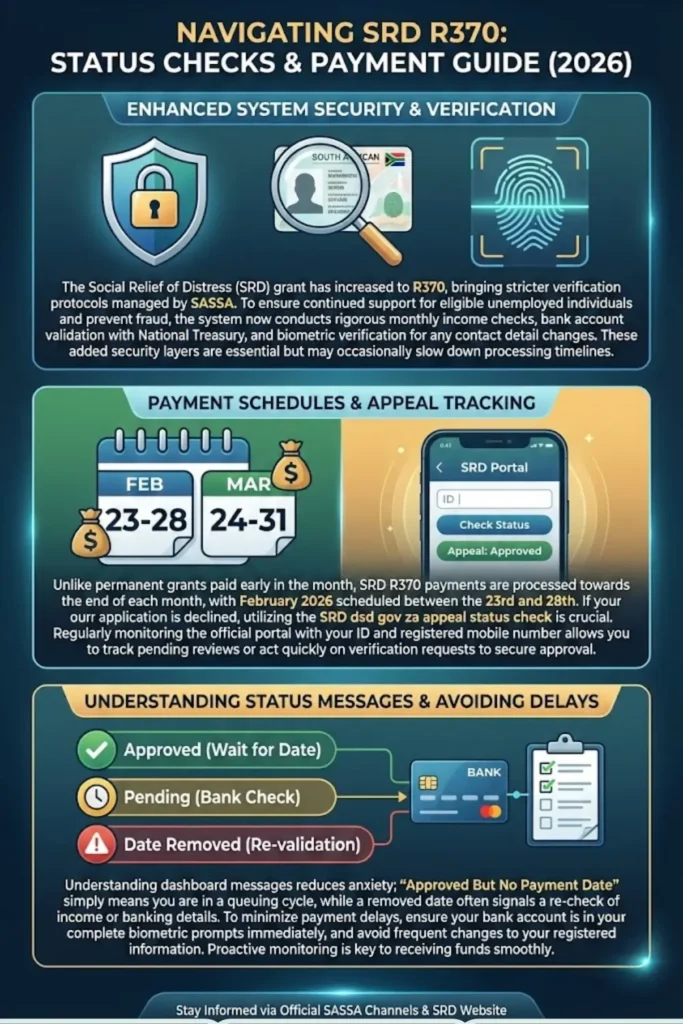
Due to increased fraud prevention and stricter financial screening, the system now performs:
- Monthly income verification checks
- Bank account validation with National Treasury
- Biometric verification for mobile number changes
- Identity confirmation against government databases
These added layers improve system security but may slow down approval and payment timelines.
You can also read: SASSA Approved Status Check Common Problems With Approved Status
Latest SRD R370 Payment Dates – February and March 2026
Payment processing for the SRD R370 does not follow the same schedule as permanent grants. Instead, payments are processed toward the end of each month.
For February 2026, the official processing window is:
- February 23, 2026 – February 28, 2026
Important payment notes:
- Beneficiaries using direct bank transfers usually receive funds faster.
- Retail collection (Checkers, Boxer, Pick n Pay) may reflect slightly later.
- Once a payment date appears, allow 2–3 business days for funds to reflect.
- January 2026 payments were completed on January 31.
For March 2026, expected processing is between:
- March 24, 2026 – March 31, 2026
SRD payments are typically not processed during the first week of the month because permanent grants are prioritized.
SRD Payment Schedule Archive (2025 – 2026)
Below is a summary of the projected and completed SRD payment windows to help with financial planning.
| Month | Payment Window | Status |
|---|---|---|
| January 2025 | Jan 24 – Jan 31 | Completed |
| February 2025 | Feb 21 – Feb 28 | Completed |
| March 2025 | Mar 25 – Mar 31 | Completed |
| April 2025 | Apr 22 – Apr 29 | Completed |
| May 2025 | May 25 – May 31 | Completed |
| June 2025 | Jun 24 – Jun 30 | Completed |
| July 2025 | Jul 25 – Jul 31 | Completed |
| August 2025 | Aug 25 – Aug 30 | Completed |
| September 2025 | Sep 25 – Sep 30 | Completed |
| October 2025 | Oct 24 – Oct 29 | Completed |
| November 2025 | Nov 24 – Nov 30 | Completed |
| December 2025 | Dec 19 – Dec 24 | Completed |
| January 2026 | Jan 26 – Jan 31 | Completed |
| February 2026 | Feb 23 – Feb 28 | Current |
Please note that public holidays may slightly adjust processing windows.
SRD dsd gov za Appeal Status Check Guide
If your application was declined, you have the right to submit an appeal. Checking your appeal status regularly helps you stay informed and act quickly if additional verification is required.
To check your SRD appeal status:
- Visit the official SRD portal.
- Enter your South African ID number.
- Provide the mobile number used during application.
- Click on “Appeal Status” or “Check Status.”
Your appeal outcome may show:
- Pending: Under review.
- Approved: Payment will be scheduled.
- Declined: Reason will be provided for rejection.
Appeals can take several weeks depending on verification backlogs. Always ensure your banking details and contact information are accurate.
You can also read: SASSA Pension Increase 2026 For Older Register
Meaning of SRD Status Messages
Many beneficiaries feel confused when they see different dashboard messages. Understanding these messages can reduce anxiety and unnecessary follow-ups.
Approved But No Payment Date
This means you passed the means test. However, your payment is still being grouped into a batch. Payments are released in cycles rather than individually.
Payment Date Added
When a date appears:
- The payment has been processed.
- Funds are sent to your bank on that date.
- Allow 48 hours before attempting withdrawal.
Payment Date Removed
This usually happens if:
- There is a change in your income status.
- Identity verification requires re-checking.
- Bank details fail verification.
Pending After Approval
This often indicates bank verification is still in progress. Monthly account validation is mandatory to ensure you meet income requirements.
Standard Grant Payment Schedule for 2026
Permanent grants follow a different payment structure compared to the SRD R370 grant. These grants are paid at the beginning of each month.
Typical payment order:
- Older Person Grant: 2nd or 3rd of the month
- Disability Grant: Day after Older Person Grant
- Child Support Grant: Day after Disability Grant
These grants are processed first, which explains why SRD payments begin later in the month.
Common SRD Payment Delays and Solutions
Payment delays can happen for several reasons. Identifying the cause early can help you resolve the issue faster.
Biometric Verification Delays
If you recently changed your mobile number, stricter biometric checks may delay your payment.
Solution:
- Complete identity verification promptly.
- Use the same ID details as your original application.
Bank Detail Changes
Updating banking information can delay payments for up to 10 business days.
Important reminders:
- Ensure the bank account is in your name.
- Avoid submitting multiple changes at once.
- Wait for confirmation before expecting payment.
Income Threshold Issues
The SRD system checks your financial status monthly. If income above the allowed threshold is detected, payment may be paused.
How to Check Your SRD R370 Payment Date
There are three main methods to confirm your SRD payment details:
1. Online Status Check
- Visit the official SRD website.
- Enter your ID number.
- Provide your registered phone number.
- Check the “Payment ID” and “Date” section.
2. WhatsApp Method
- Send a message to 082 046 8553.
- Select the Status Check option.
- Follow the automated prompts.
3. USSD Code
- Dial 1203227#.
- Follow the instructions on your phone screen.
Always keep your phone number active to receive payment notifications.
You can also read: NSFAS 2026 Applications Finalised Status
Conclusion
The SRD dsd gov za appeal status check and updated SRD R370 payment dates are essential for beneficiaries who rely on timely financial support. While stricter verification has improved system security, it has also increased processing times.
To avoid delays:
- Keep your banking details accurate.
- Monitor your dashboard regularly.
- Complete biometric verification when requested.
- Check payment windows toward the end of each month.
By staying informed and proactive, you can ensure smoother access to your SRD R370 grant without unnecessary stress.
